How to Spot a Rug Pull on Solana in 2026 (5 Quick Checks)
Crypto holders lost $1.8B to rugs in 2025. Run these 5 on-chain checks on Solscan and DexScreener before buying any Solana token. Takes 30 seconds.
The 30-Second Test
Rugs cost crypto holders $1.8 billion in 2025 alone. Most of those losses are preventable. Almost every rug fails at least two of the same five checks, and every check takes one click on Solscan or DexScreener.
If a token fails 2 or more of these, walk. No exceptions.
This is the practical version: no theory, no jargon, just where to click and what to read.
Red Flag 1, Mint Authority NOT Revoked
This is the single most important check. If the creator can still mint new tokens, the supply is not fixed. They can wake up tomorrow and 100x the supply for their own wallet, dumping it on you.
How to check:
- Open Solscan and paste the token mint address
- Scroll to the token info card
- Look for "Mint Authority"
What you want to see: None (or Revoked). Some explorers display this implicitly as Fixed Supply, the supply line in the token info card stops being editable.
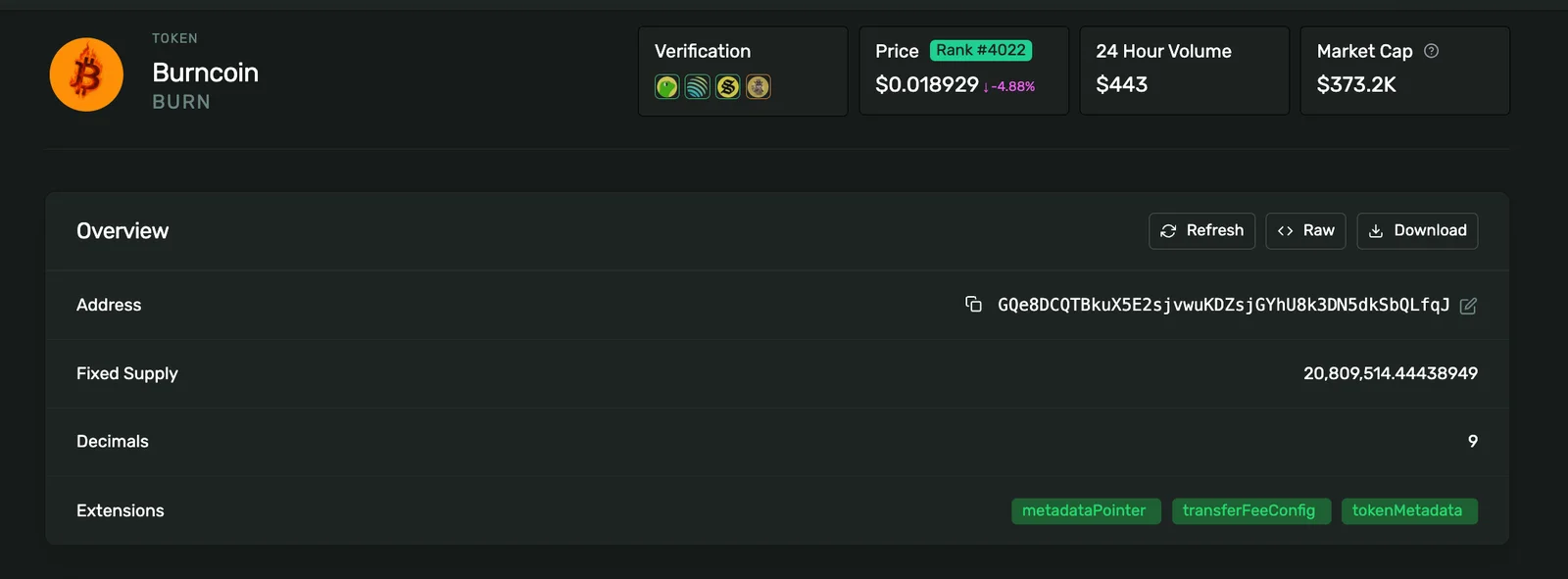
Walk if: there's any address there. That address can mint infinite supply.
Some legitimate projects keep mint authority for staking rewards or planned emissions. But for a meme coin or "fixed supply" token, mint authority should be revoked at launch. If you can't tell which case it is, default to walking.
Red Flag 2, Freeze Authority NOT Revoked
If freeze authority is active, the creator can freeze your wallet, making your tokens unsellable while they exit. This is the cleanest exit scam vector on Solana.
It works like this:
- Creator sells their bag
- Real buyers try to sell
- Creator freezes the buyer wallets one by one
- Tokens become unsellable. Stuck holders watch the price hit zero.
How to check:
- Solscan → token mint
- Token info card → "Freeze Authority"
What you want to see: None.
Walk if: there's any address there. No legitimate Solana token launch needs freeze authority active. The only exceptions are stablecoins and regulated tokens, not meme coins.
Red Flag 3, Liquidity Not Locked (or Locked < 6 Months)
Without a liquidity lock, the dev can pull the LP at any time and your token instantly becomes worth zero. This is the original "rug pull", pulling the rug literally means pulling the liquidity.
A proper liquidity lock sends the LP tokens to a time-locked smart contract so the dev physically cannot withdraw them before the lock expires. Permanent locks (no expiry, ever) are even better, fees are still claimable but the principal is forever.
How to check:
- Open DexScreener for the token
- Look for the lock badge (a closed padlock icon)
- Click for lock duration
What you want to see:
- Permanent / never-expiring lock, best
- 12+ month lock, good
- 6-12 month lock, acceptable
- Under 30 days, warning sign
- No lock, stop sign
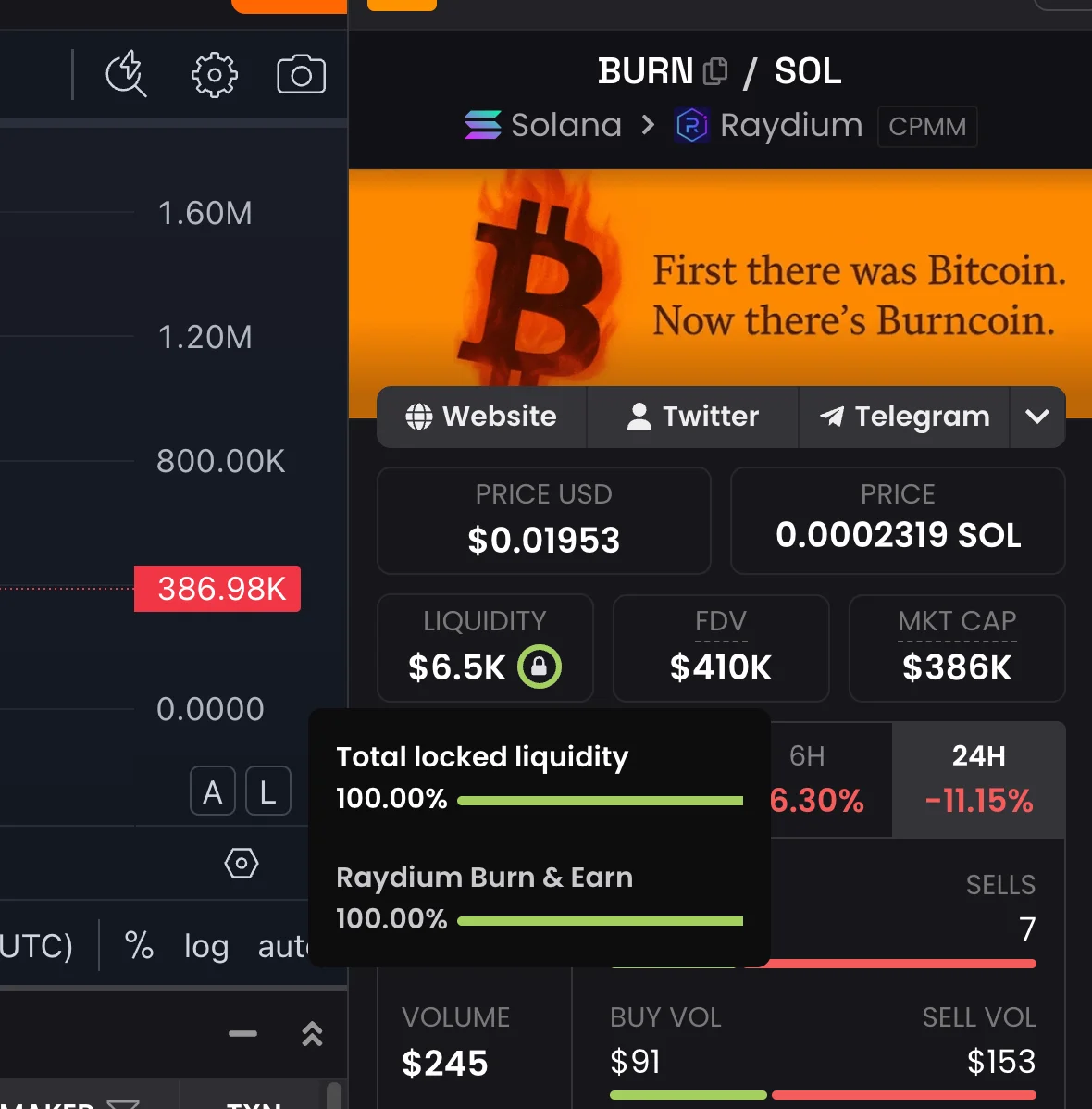
DexScreener and Birdeye both show lock status with a badge. If the lock badge is missing entirely, treat it as no lock.
Red Flag 4, Top 10 Wallets Hold >30% of Supply
If 10 wallets control a third of the float, one coordinated dump cuts your bag in half. Sniper bots, insiders, or the dev itself often accumulate in the first seconds, and they can move all at once when they want out.
How to check:
- Solscan → token mint → "Holders" tab
- Read the top 10 distribution
Healthy distribution:
- Top 10 wallets: under 20%
- Top wallet (excluding LP): under 5%
- LP wallet present and locked
Walk if:
- Top 10 wallets > 30%
- Single wallet > 10% (excluding the LP)
- Recent holders all created in the same minute (sniper cluster)
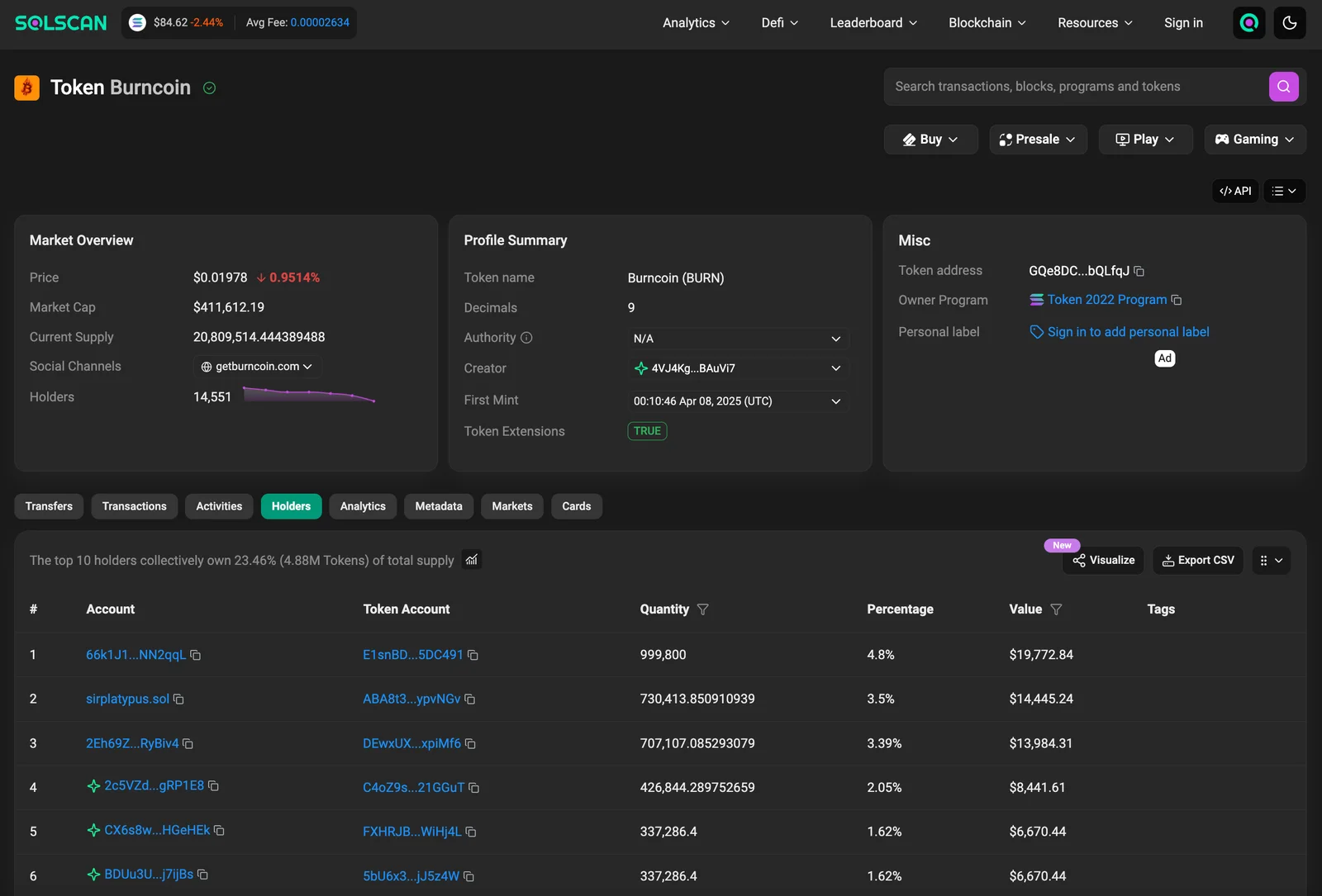
The LP wallet itself usually holds a large chunk and that's fine, that's the locked liquidity. What you're checking is whether NON-LP wallets are concentrated.
Red Flag 5, Metadata Authority NOT Revoked
If metadata authority is still active, the creator can rename the token, swap the logo, or change the symbol, after you bought it. The "blue chip" you aped into yesterday can become a completely different coin overnight, with you holding bags labeled with a brand that no longer exists.
This is one of the more subtle rug vectors and most buyers don't check it. But it's a real exit scam pattern: rebrand the token to abandon the old community while keeping the supply.
How to check (Token-2022):
- Solscan → token mint → "Extensions" tab
- Look for "Metadata" extension → "Update Authority"
How to check (Classic SPL):
- Solscan → token mint
- Find the Metaplex metadata account
- Check "Update Authority"
What you want to see: updateAuthority: NULL (revoked).
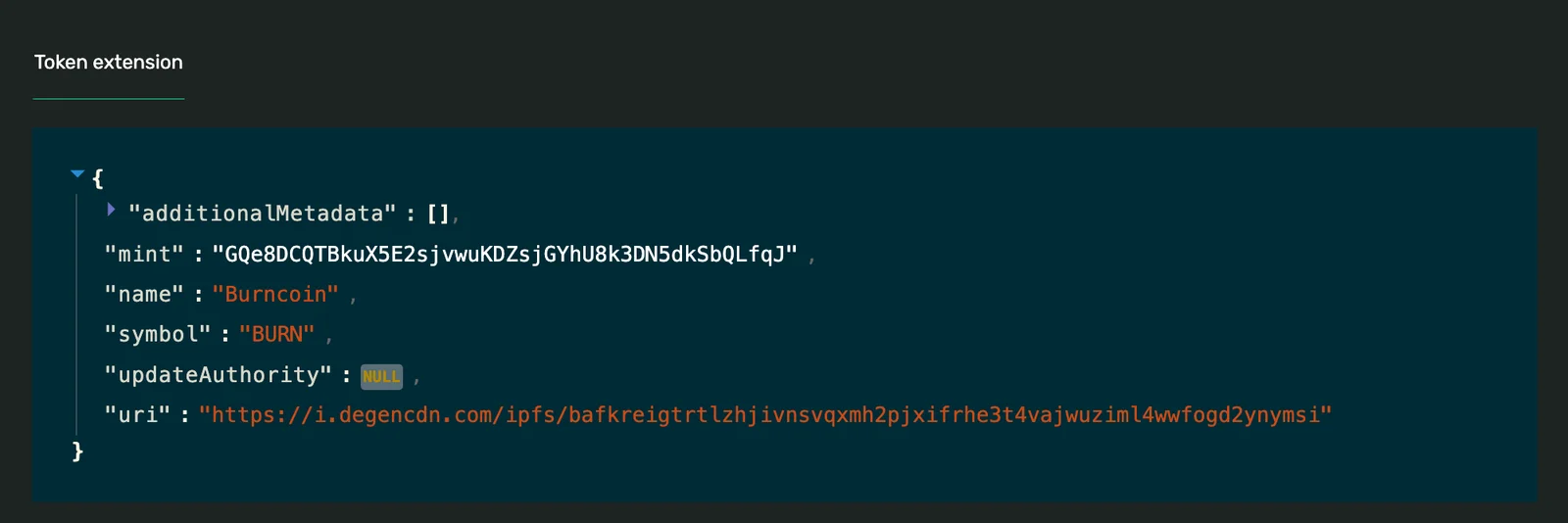
Walk if: active and there's no clear reason for the project to need metadata mutability.
If you're not sure whether the token is Token-2022 or classic SPL, the explorer will tell you in the token info card.
The 30-Second Workflow
Here's the actual sequence in order of speed:
- Solscan → mint authority + freeze authority + metadata authority, 10 seconds
- Solscan Holders tab → top 10 distribution, 10 seconds
- DexScreener → liquidity lock badge + duration, 10 seconds
Three tabs. Five checks. 30 seconds.
If 4 or 5 are green, you've ruled out the obvious rugs. That doesn't make the token a winner, but it removes the floor from "instant zero" to "needs actual price discovery."
Run the 30-second check automatically.
Paste any Solana mint address and get all five red flags checked on-chain in one report: mint, freeze, metadata, LP lock, and holder concentration.
Run a Free Rug CheckWhat Doesn't Show Up in This Check
These red flags are necessary but not sufficient. They catch the structural rugs, the ones where the token is technically capable of becoming worthless on the dev's command. They do NOT catch:
- Soft rugs, the dev fades, the project dies, the token bleeds out over weeks
- Telegram rugs, coordinated dump from inside the chat
- Influencer rugs, paid shilling, then exit
- Smart-contract bugs, uncommon on Solana but possible
- Custom transfer hooks, for Token-2022 with hooks, check what the hook program does before buying
For those, you need broader research: who's the team, what's the product, who's promoting it and why.
Why Most Solana Tokens Fail These Checks
Because launching a token on most platforms doesn't revoke any of these by default. Pump.fun bonding-curve tokens don't have them set the way you'd want. Custom dev launches usually skip the revocations to "make changes later." Cheap launches often skip the lock to save SOL.
A token that ships with all 5 green flags signals one thing: the creator chose to surrender control before launch. They can't rug even if they want to. That's the shape of a legitimate launch.
Where SolFoundry Stands
SolFoundry is built so that every flag is green by default:
- Mint authority, revoked at launch (one click in the launch flow)
- Freeze authority, revoked at launch
- Liquidity lock, permanent lock via Meteora DAMM v2 (free for SolFoundry tokens)
- Holder distribution, anti-sniper fee scheduler keeps bots from cornering supply at launch (read more)
- Metadata authority, revoked at launch (Token-2022 native or Metaplex)
Every cost is shown before you sign. No hidden authorities, no surprise mutability windows. The launch is permissionless and irreversible, the same way a buyer wants it.
FAQ
What is a rug pull? A rug pull is when a token's creator drains its value, by minting infinite supply, removing liquidity, freezing wallets, or rebranding the token, leaving holders with worthless bags. Most rugs use one of the 5 patterns above.
Can I undo a rug pull? No. Once liquidity is removed, supply is minted, or wallets are frozen, the chain is final. Solana transactions don't reverse. Your only recovery path is the very small chance that exchanges freeze the proceeds, which almost never happens.
Are pump.fun tokens safer or riskier than launchpad tokens? Riskier on average. Pump.fun bonding curves have no mint/freeze/metadata revocation by default and the migration to a real DEX pool happens later, until then, lock and supply checks don't apply cleanly. Many pump.fun tokens are fine, but the structural protections don't exist.
How do I check freeze authority for a token in my wallet? Click the token in Phantom or Solflare, tap "View on Solscan" (or paste the mint address into solscan.io). The token info card shows mint authority, freeze authority, and supply. All three should be set the way you expect for the token's stated purpose.
Do these checks work for Token-2022 tokens? Yes. The fields are in the same place on Solscan. For Token-2022 specifically, also check the Extensions tab, if a transfer hook is listed, look at what program it points to. A hook can enforce rules but it can also block transfers entirely. Treat unknown hook programs as a red flag.
Why do legit projects sometimes fail one of these checks? Some legitimate projects keep mint authority active for emissions or staking rewards (rare in meme coins, common in DeFi protocols). Some keep metadata mutable to update the logo or description. The rule of thumb: if you can't articulate why a flag is yellow, treat it as red.
Is there a tool that checks all 5 automatically? DexScreener, Rugcheck.xyz, and similar trust scanners aggregate most of these signals. They're useful but check the raw data on Solscan yourself before any meaningful purchase, scanners can lag, miss edge cases, or be gamed.
The 5 flags above aren't every check that matters. But they're the cheapest possible filter, the one that removes the most rugs for the least effort. Run them every time, even on tokens your favorite KOL is shilling.
Ready to launch a token that passes all 5 by default? Start your launch on solfoundry.io, every trust signal is configured and revoked before the launch transaction ships.
Keep reading
How to Buy a New Solana Token Safely (2026)
How to buy a new Solana token safely: get a wallet, find the real mint, verify it can't rug you, and buy through Jupiter without getting sandwiched or honeypotted.
Solana Ticker Squatting: How Fake Tokens Clone Real Projects to Fool Buyers
A token scored 100/100 on our rug-check tool days before crashing 95%. Here's the blind spot we found, and the three checks we shipped to close it.
How to Find Trending Solana Tokens Without Getting Rugged (2026)
How to find trending Solana tokens without buying a rug: why most 'trending' lists are pay-to-promote, how to spot real volume, and the 10-second safety check.