How to Protect a Solana Token from Snipers in 2026 (Free)
Sniper bots drain new Solana tokens in block 0. Learn how anti-sniper fee decay and fair launch windows stop them on launch day. Free, on-chain, no code.
What Are Sniper Bots?
Every time a new liquidity pool launches on Solana, bots are watching. Within milliseconds of the pool going live, they execute buy orders, accumulating a massive share of the token supply before any real buyer has a chance.
These are sniper bots, and they're one of the biggest problems in crypto token launches.
Here's what a typical sniper attack looks like:
- Creator launches a pool with 100M tokens + 1 SOL
- Within 200 milliseconds, a bot buys 20% of the supply
- Real buyers start buying minutes later, pushing the price up
- The bot dumps its 20% on real buyers, crashing the price
- The bot walks away with profit. Real buyers hold the bags.
This happens on every chain, but Solana's speed makes it worse, bots can execute in under a second.
Why Regular Launches Are Vulnerable
When you create a standard liquidity pool, the trading fee is fixed at 0.25%. This means a sniper pays the same fee whether they buy in the first millisecond or the first hour.
For a bot, 0.25% is nothing. If it accumulates 20% of supply and dumps for a 5x, that's a 500% return minus 0.50% in fees. The math overwhelmingly favors the bot.
The problem isn't speed, it's that there's no cost to being first.
How Anti-Sniper Protection Works
SolFoundry's anti-sniper protection changes the economics completely. Instead of a fixed fee, it uses Meteora's fee time scheduler, an exponential decay curve that starts with extremely high trading fees and gradually drops to normal levels.
The idea is simple: make the first few minutes expensive to trade in. Snipers who buy immediately pay massive fees. Real buyers who wait a few minutes pay normal rates.
Here's how the fee curve works:
- At launch: The pool charges a high fee (5%, 15%, or 50% depending on your preset)
- Over time: The fee decays exponentially toward the standard 0.25%
- After the protection window: Normal trading fees apply permanently
The decay is exponential, not linear. This means fees drop quickly after the initial window but stay high enough in the critical first minutes to make sniping unprofitable.
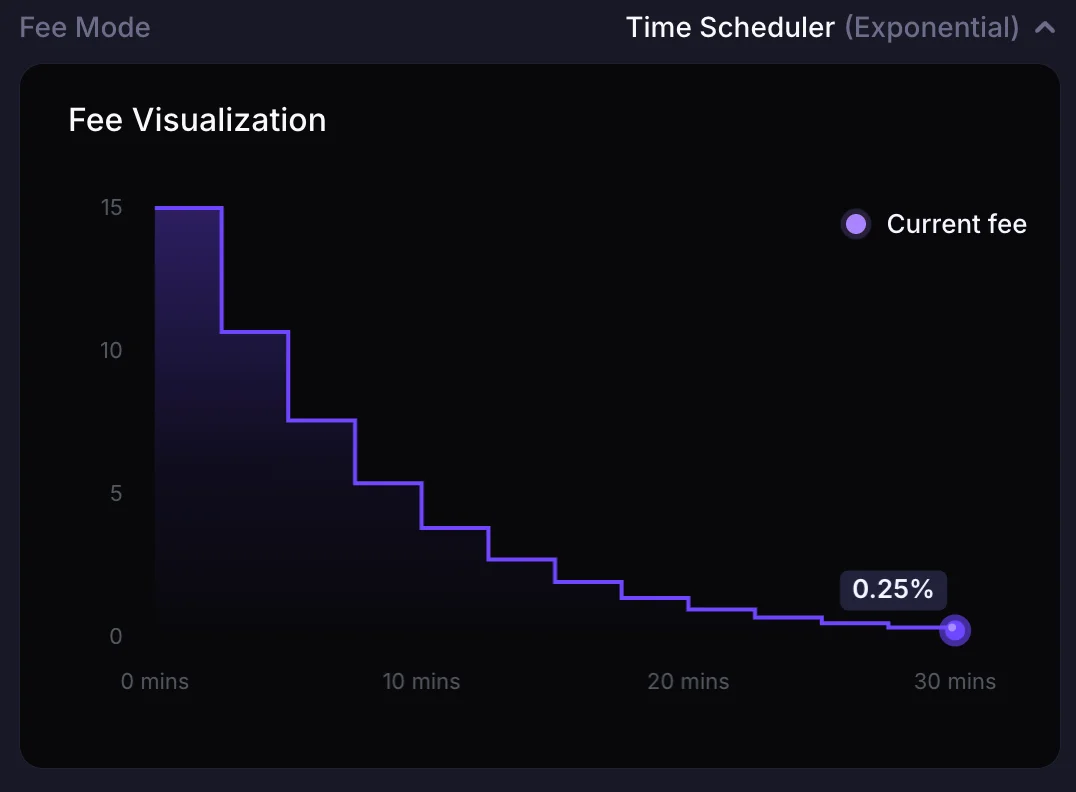
The curve is on-chain, Meteora reads the scheduler config from the pool itself, so any explorer or aggregator can render the same shape.
Three Presets to Choose From
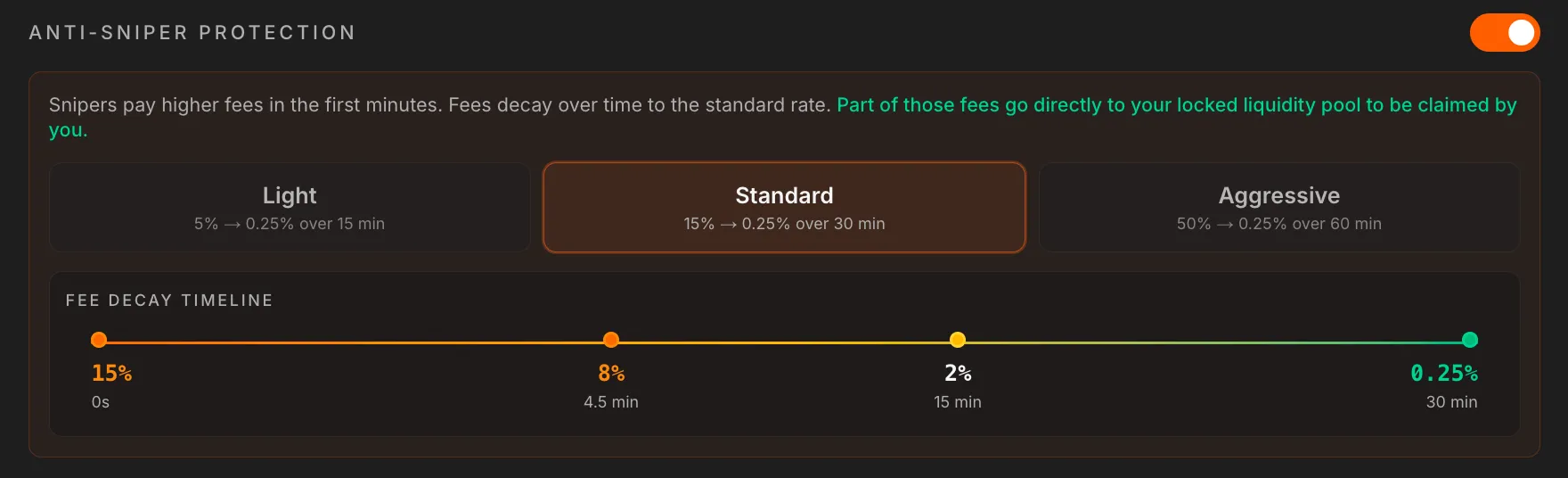
SolFoundry offers three protection levels. Each one is designed for a different launch scenario:
| Preset | Starting Fee | Final Fee | Duration | Best For |
|---|---|---|---|---|
| Light | 5% | 0.25% | 15 min | Low-profile launches, small communities |
| Standard | 15% | 0.25% | 30 min | Most launches (recommended) |
| Aggressive | 50% | 0.25% | 60 min | High-visibility launches, large communities |
Light (5% over 15 minutes)
A gentle deterrent. Snipers still lose money, but the fee isn't punishing enough to stop the most aggressive bots. Best for tokens launching to a small, trusted community where sniping isn't a major concern.
Standard (15% over 30 minutes)
The recommended setting for most launches. A 15% starting fee makes sniping mathematically unprofitable, the bot would need the price to increase 18% just to break even. By the time real buyers arrive after a few minutes, fees are already dropping toward normal levels.
Aggressive (50% over 60 minutes)
Maximum protection. A bot buying at launch loses half its investment immediately to fees. This is designed for high-profile launches where significant sniper activity is expected. The tradeoff is that even real buyers pay elevated fees if they buy in the first 10-15 minutes.
Where Do the Sniper Fees Go?
This is the best part: sniper fees go directly to your locked liquidity.
When a bot pays a 15% fee on a large buy, that fee doesn't disappear. It gets deposited into the liquidity pool and accrues to the creator's locked position. You can claim these fees anytime from your SolFoundry dashboard.
In other words, snipers are literally funding the token creator. The worse the sniping attempt, the more fees the creator earns.
How to Enable Anti-Sniper Protection
Anti-sniper protection is configured when you create your liquidity pool on SolFoundry's Liquidity Lock page. Here's the process:
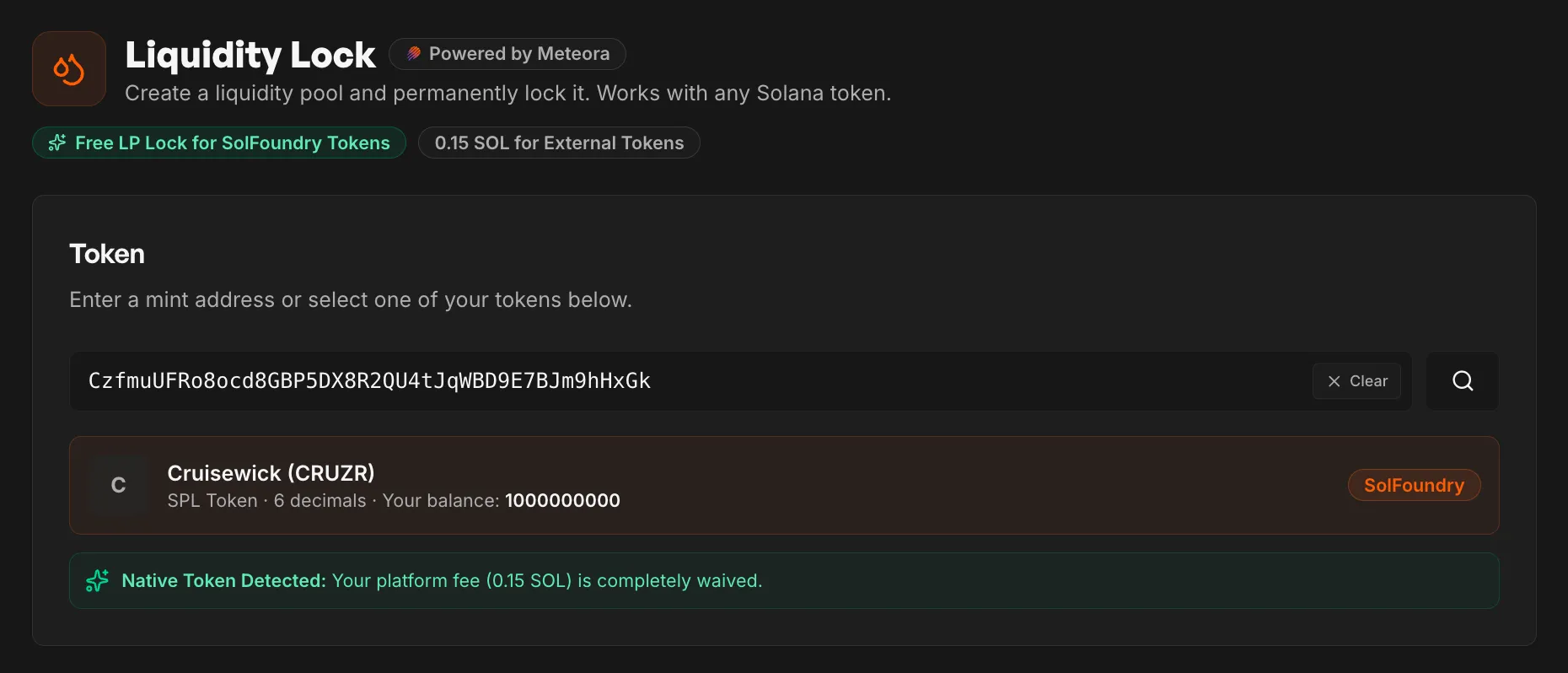
- Go to Liquidity Lock, paste your token mint or select from "Your Tokens"
- Set your pool parameters, choose how much SOL and tokens to deposit
- Toggle on Anti-Sniper Protection, the option appears below the pool settings
- Choose a preset, Light, Standard, or Aggressive
- Create Pool + Lock Liquidity, one transaction does everything
The entire setup happens in a single atomic transaction. Anti-sniper protection is activated the moment the pool goes live, there's no gap where bots can sneak in.
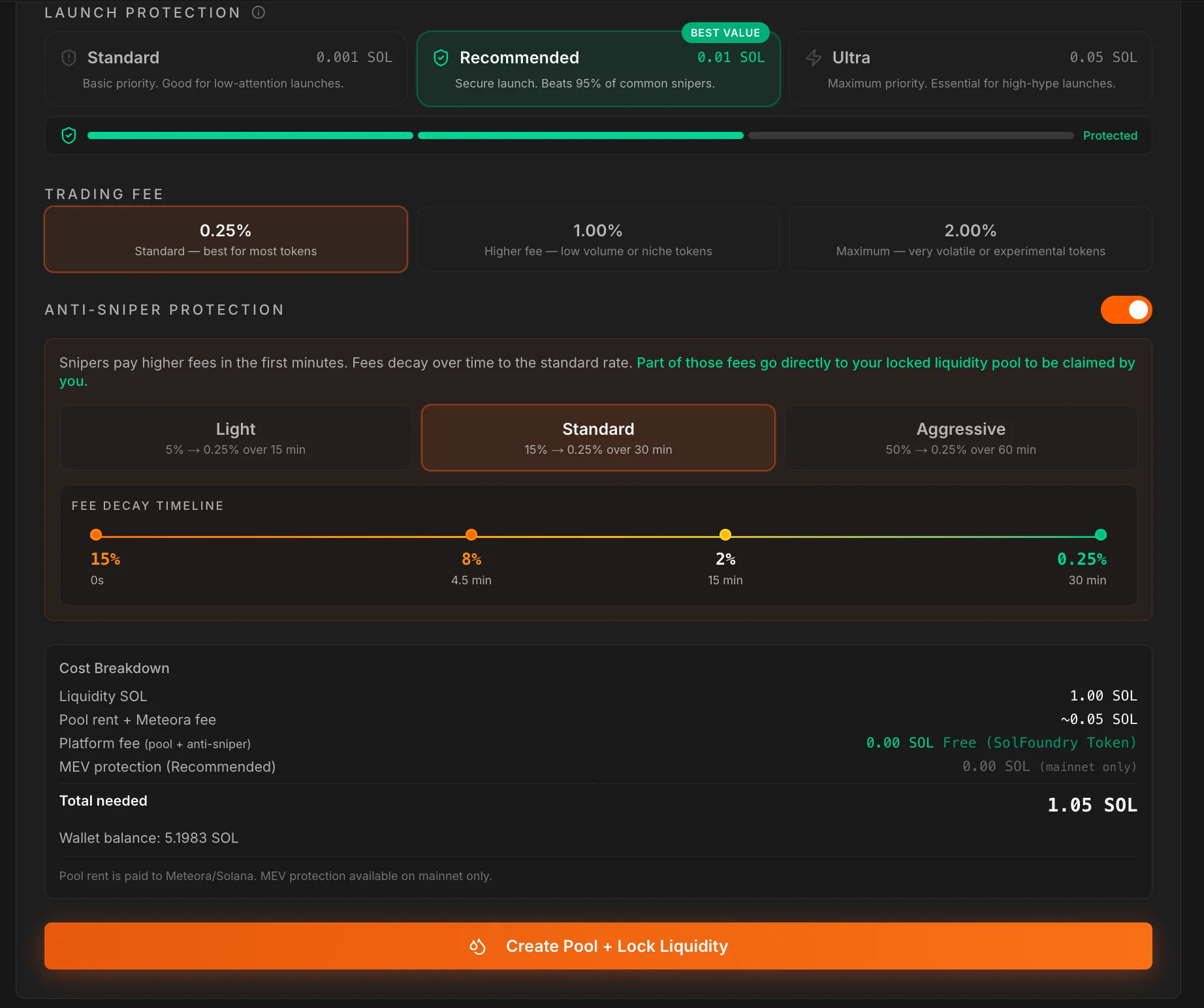
Cost: Free. Anti-sniper protection has zero platform fees. The only cost is the standard Solana network rent for creating the pool.
Real Math: Why Sniping Doesn't Work
Let's run the numbers for a sniper bot attacking a pool with Standard protection (15% starting fee):
Without anti-sniper:
- Bot buys 10 SOL of tokens at 0.25% fee = 0.025 SOL in fees
- Price increases 50% from organic buying
- Bot sells for 15 SOL at 0.25% fee = 0.0375 SOL in fees
- Bot profit: ~4.94 SOL
With anti-sniper (Standard):
- Bot buys 10 SOL of tokens at 15% fee = 1.50 SOL in fees (only 8.50 SOL worth of tokens)
- Price increases 50% from organic buying
- Bot sells for 12.75 SOL at ~8% fee (partially decayed) = 1.02 SOL in fees
- Bot profit: ~1.23 SOL (vs 4.94 without protection)
And with Aggressive protection (50%), that same trade becomes a net loss for the bot. The math simply doesn't work.
Launch with anti-sniper protection built in.
Every SolFoundry launch can enable fee decay and a fair launch window in one click. The first 100 launches pay zero platform fee. Network fees still apply (~0.02 SOL).
Claim Free SlotAnti-Sniper vs Other Protection Methods
There are other approaches to preventing sniping. Here's how they compare:
| Method | How It Works | Drawbacks |
|---|---|---|
| Whitelist/Presale | Only approved wallets can buy early | Centralized, excludes real buyers |
| Max wallet limits | Cap how much one wallet can hold | Bots use multiple wallets |
| Buy cooldowns | Delay between buys | Hurts real buyers, bots adapt |
| Fee decay (SolFoundry) | High fees that decay over time | None, transparent, on-chain |
Fee decay is the only method that's fully transparent, permissionless, and doesn't restrict legitimate buyers. Anyone can buy at any time, they just pay a higher fee if they buy too early.
Tips for Choosing Your Preset
- Launching to a small community? Use Light. Your buyers know when the pool goes live and can wait a few minutes.
- Public launch with social media promotion? Use Standard. It balances protection with a reasonable fee window.
- Expecting heavy sniper activity? Use Aggressive. Accept that early buyers pay higher fees, it's worth the protection.
- Not sure? Start with Standard. It's the right choice for 90% of launches.
How to Tell If a Launch Was Sniped
Useful in both directions: checking a token before you buy it, and doing the post-mortem on your own launch. Three signals, all public on-chain:
- Same-block buys. Open the token's first transactions on Solscan and look at the block where the pool went live. Multiple fresh wallets buying in that exact block, before any human could have reacted, is the sniper signature. Humans take seconds; bots take milliseconds.
- The spike-and-stairs chart. An instant price spike in the first minute followed by a stair-step decline over the next half hour is supply being distributed by bots into organic buyers. Real community demand builds jagged and messy, not a clean pump into a programmatic unwind.
- A cluster of similar-sized holders. Snipers split their position across wallets to look distributed. A top-10 holder list where several wallets hold near-identical amounts, funded around the same time, is one operator wearing ten masks.
You don't have to eyeball all of this manually: our free rug check reads the top-holder distribution and flags suspicious trading patterns (extreme volume-to-market-cap churn after a spike) on any Solana mint, no wallet connection needed.
FAQ
Does anti-sniper protection cost extra? No. It's completely free on SolFoundry. There's no additional platform fee for enabling it.
Can I change the preset after the pool is created? No. The fee schedule is set at pool creation and cannot be modified afterward. This is by design, it ensures the rules are transparent and unchangeable.
Does it stop ALL bots? It makes sniping unprofitable, which stops most bots. A bot could still buy at a loss, but there's no economic incentive to do so.
Will my real buyers be affected? If they buy in the first few minutes, they'll pay higher fees. Communicate to your community that waiting 5-10 minutes after launch gets them better rates. With Standard protection, fees drop below 5% within the first 10 minutes.
Do I need to lock liquidity to use anti-sniper? Yes. Anti-sniper protection is configured as part of the Meteora pool creation on SolFoundry's Liquidity Lock page. The liquidity is permanently locked in the same transaction.
Can I use anti-sniper with any token? Yes. It works with any SPL or Token-2022 token on Solana, whether launched on SolFoundry or another platform.
Ready to launch with sniper protection? Head to solfoundry.io and enable anti-sniper protection when you lock your liquidity, it's free.
Keep reading
Fair Launch Window on Solana: Stop Block-0 Snipers
Delay trading on your Solana token pool by 30 seconds to 60 minutes. Block-0 snipers can't buy until the window closes. Free, on-chain, stacks with anti-sniper fee decay.
What is Locked Liquidity? Solana LP Locks Explained (2026)
What is locked liquidity and why does every legit Solana token launch need it? Plain-English guide to LP locks, how long to lock, and how to verify a lock on-chain.
What to Do After Launching a Solana Token: 5 Steps (2026)
Minted your Solana token, now what? 5 post-launch steps: seed real liquidity, put supply in the pool, lock the LP, run a rug check, survive hour one.