What is Locked Liquidity? Solana LP Locks Explained (2026)
What is locked liquidity and why does every legit Solana token launch need it? Plain-English guide to LP locks, how long to lock, and how to verify a lock on-chain.
Locked liquidity is a smart contract mechanism that permanently freezes the liquidity pool of a token, so the creator can never remove the funds backing it. Once locked, the pool stays tradeable forever and rug pulls become technically impossible. On Solana in 2026, the modern way to lock liquidity is through Meteora DAMM v2 permanent locks, which keep the irreversibility of an LP token burn while still letting the creator claim trading fees.
What is Locked Liquidity?
Locked liquidity means the tokens and SOL deposited into a liquidity pool are mathematically prevented from being withdrawn by the pool creator. The lock is enforced on-chain by a smart contract, not by trust or by a third-party custodian.
When a token's liquidity is locked:
- Buyers can always sell back to the pool
- The creator cannot drain the pool and disappear
- The lock is visible on DexScreener and other trackers as a "green lock" trust signal
- The pool keeps generating trading fees for whoever holds the locked position
This is the single most important trust signal in a memecoin or community token launch. If you see a Solana token without locked liquidity, treat it as a rug-pull risk by default.
The Problem: Rug Pulls
In crypto, a "rug pull" happens when a token creator removes all the liquidity from a trading pool, crashing the price to zero and running away with investors' money.
This is the single biggest fear for anyone buying a new token. And it's justified: thousands of tokens get rugged every month across all chains. Most of them share one missing trust signal — liquidity that was never locked.
Liquidity locking solves this. When liquidity is permanently locked, nobody, not even the creator, can ever remove it. The pool stays active forever.
How Liquidity Pools Work
Before diving into locking, let's understand what a liquidity pool is.
When you launch a token, it has no market. Nobody can buy or sell it because there's no trading pair. To make it tradeable, you create a liquidity pool, a smart contract that holds both your token and SOL (or another base currency).
Here's the flow:
- You deposit tokens + SOL into a pool (e.g., 100M tokens + 1 SOL)
- The pool sets an initial price based on the ratio
- Anyone can now swap SOL for your token (and vice versa)
- The price moves up when people buy, down when they sell
The pool creator receives proof of their deposit, either LP tokens (traditional) or a position NFT (Meteora DAMM v2).
Why Locking Matters
Without locking, the creator can withdraw their liquidity at any time. This means:
- Day 1: Creator adds 1 SOL + 100M tokens to the pool
- Day 3: Token pumps, pool now holds 50 SOL + 20M tokens
- Day 3, 2 minutes later: Creator removes all liquidity, walks away with 50 SOL
Everyone who bought the token is left holding worthless bags with no way to sell.
Locking prevents this entirely. When liquidity is permanently locked:
- The tokens and SOL in the pool can never be removed
- The pool stays active for trading indefinitely
- Buyers can always sell their tokens
- It shows up as a "green lock" on DexScreener and other trackers
Types of Liquidity Locks
LP Token Burn (Traditional)
The old-school method. You burn the LP tokens that represent your share of the pool. Once burned, they don't exist anymore, nobody can use them to withdraw liquidity.
Downside: You lose access to trading fees forever. The fees accumulate in the pool but nobody can claim them.
Permanent Lock (Meteora DAMM v2)
The modern approach used by SolFoundry. Instead of burning LP tokens, the Meteora program marks your position as permanently locked on-chain.
Key difference: You still own a position NFT, and you can still claim trading fees from the locked liquidity. The lock is just as irreversible as burning, but you keep earning.
| Feature | LP Burn | Meteora Permanent Lock |
|---|---|---|
| Irreversible | Yes | Yes |
| Trading fees | Lost forever | Claimable by creator |
| Proof | Burn tx on explorer | Position NFT in wallet |
| Cost | ~0.2 SOL (Raydium) | ~0.05 SOL (Meteora) |
| Trust signal | Green lock on DexScreener | Green lock on DexScreener |
How It Works on SolFoundry
SolFoundry makes liquidity locking a one-click operation:
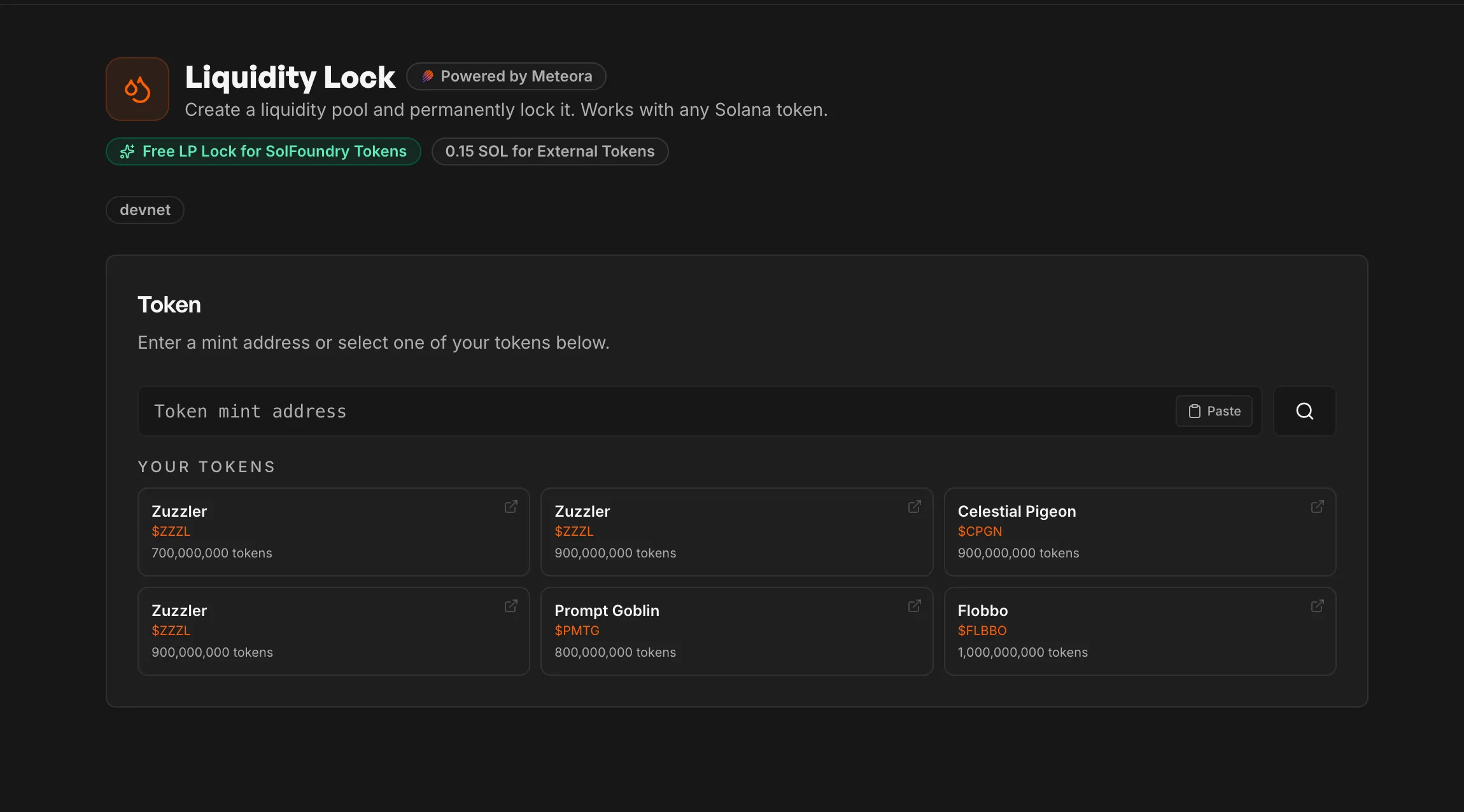
- Go to Liquidity Lock, paste your token mint or select from "Your Tokens"
- Set the amount, choose how much SOL to pair and what % of your tokens to deposit
- Enable Anti-Sniper (optional), exponential fee decay protects the first minutes of trading
- Click "Create Pool + Lock Liquidity", one transaction creates the pool and locks it permanently
The entire flow happens in a single atomic transaction. If any step fails, everything reverts, your tokens and SOL stay safe in your wallet.
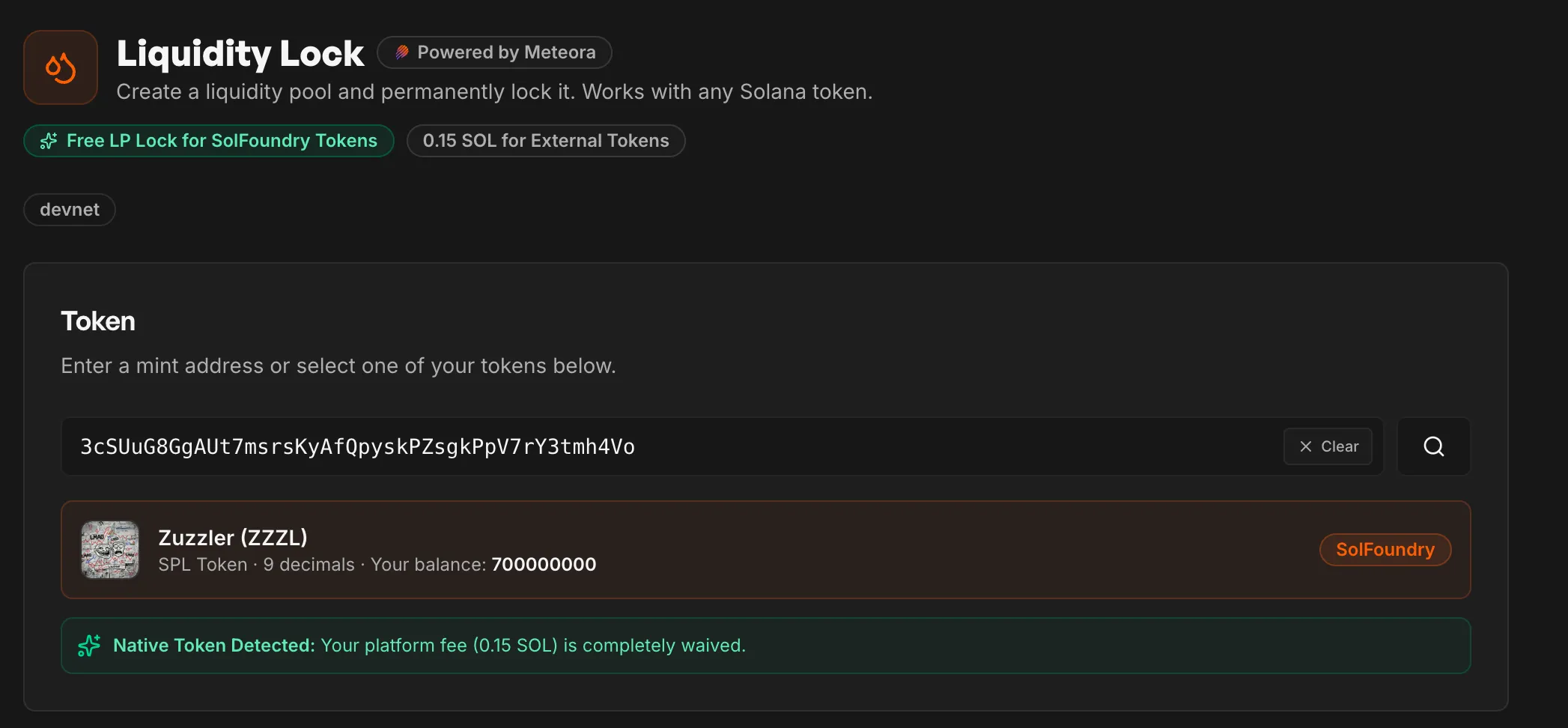
What Happens After Locking
- Your token is immediately tradeable on Jupiter, Meteora, and other Solana DEX aggregators
- The pool shows as "Permanently Locked" on-chain
- You receive a Meteora Position NFT (proof of your locked liquidity)
- Trading fees accrue to your position, claim them anytime from the "Your Tokens" page
Skip the math. Claim your free slot.
Lock the platform fee to your wallet for your first launch. Network fees still apply (~0.02 SOL).
Claim Free SlotAnti-Sniper Protection
One problem with launching a pool is that sniper bots monitor for new pools and buy in the first milliseconds, accumulating supply before regular buyers can participate.
SolFoundry solves this with Meteora's fee time scheduler. When enabled, the pool starts with high trading fees that decay exponentially:
| Preset | Starting Fee | Final Fee | Duration |
|---|---|---|---|
| Light | 5% | 0.25% | 15 minutes |
| Standard | 15% | 0.25% | 30 minutes |
| Aggressive | 50% | 0.25% | 60 minutes |
Snipers who buy in the first seconds pay massive fees. Part of those fees go directly to your locked liquidity, meaning snipers literally fund the creator.
Regular buyers who wait a few minutes pay normal fees. Everyone wins except the bots.
How to Verify a Lock
Always verify liquidity locks before buying a token. Here's where to look.
1. DexScreener — the green lock icon
Open the token's DexScreener page and look for a small green padlock next to the liquidity figure. Hover over it and DexScreener tells you the exact percentage of liquidity that's locked or burned.
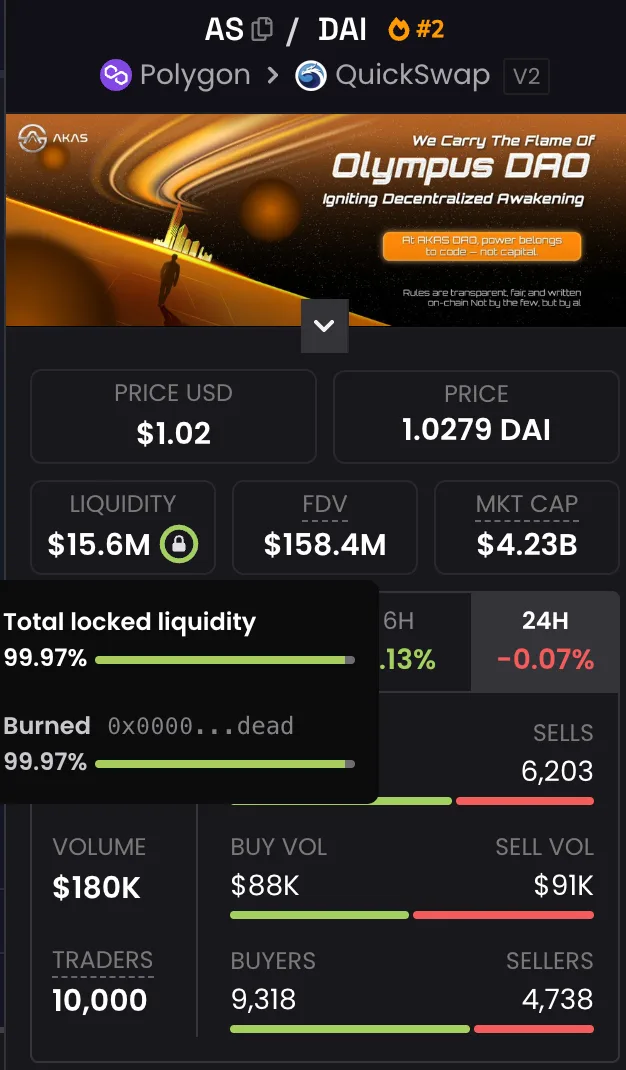
If the percentage is below ~95%, that's a partial lock — most of the liquidity is still controlled by the creator. Anything below 90% should be treated as effectively unlocked.
2. Meteora — the on-chain source of truth
For Solana tokens launched on Meteora DAMM v2, visit meteora.ag and open the pool page. The pool will explicitly state the percentage of liquidity that is permanently locked, along with the position addresses and the full liquidity allocation.
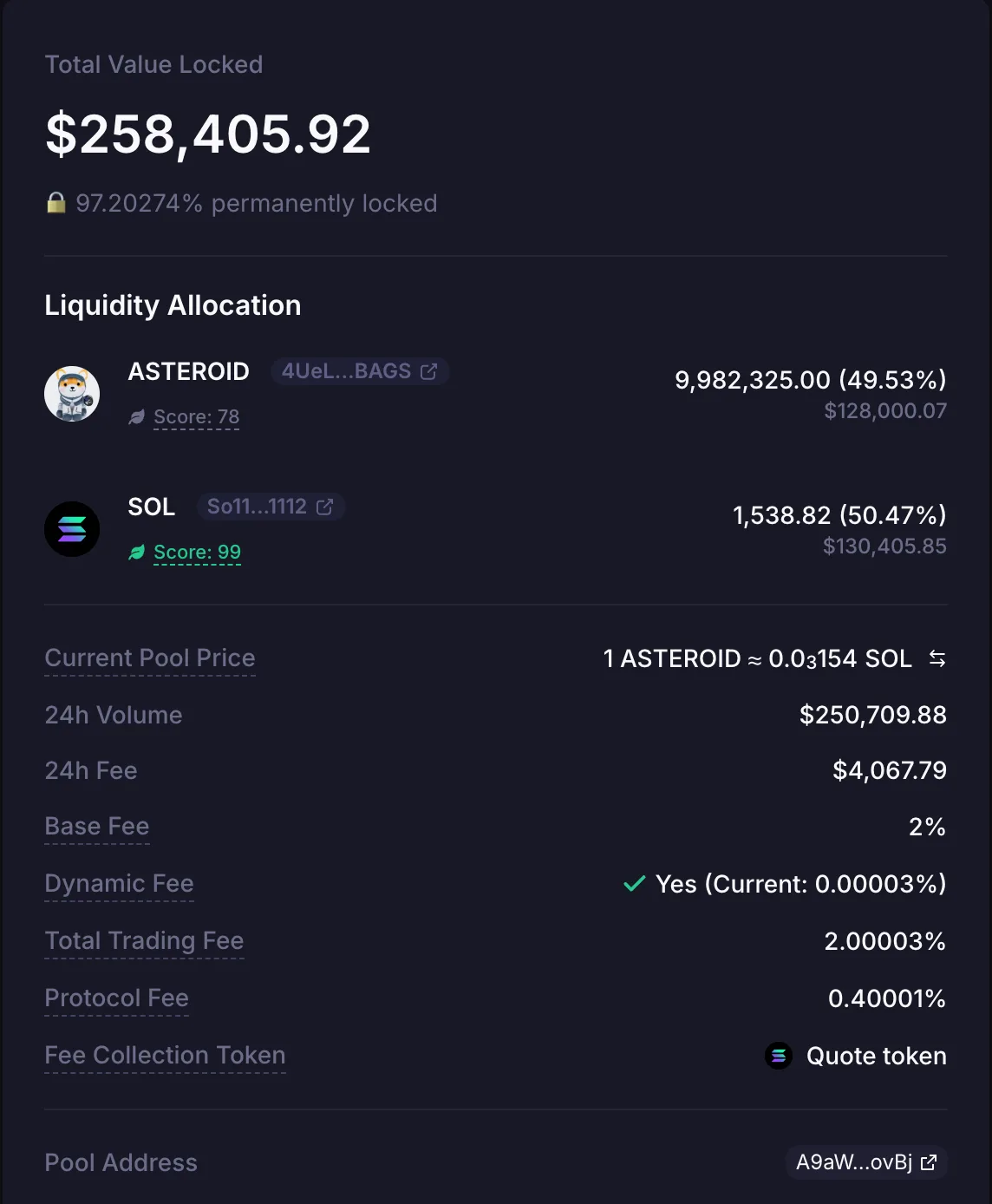
This is the most authoritative check — it reads directly from the on-chain program state. DexScreener can occasionally lag or misrepresent locks; Meteora cannot.
3. Solana Explorer — for the paranoid
If you want raw on-chain verification, open the pool account on Solana Explorer or Solscan. Check that the pool is owned by the Meteora DAMM v2 program and that the position NFT carries the permanent lock flag.
How to Spot a Fake Lock
Not every "locked" pool is actually locked. The most common scams to watch for:
- Time-locks pretending to be permanent. A lock that expires in 30 days isn't a permanent lock. Buyers see "locked" and assume safety; the creator unlocks when attention peaks. Always check the lock duration explicitly — if it's not "permanent" or "forever", it's a timelock.
- Partial locks. Creator locks 30% of the LP and keeps 70%. The DexScreener badge can still show "locked", but the creator can pull most of the liquidity. Always check the locked percentage.
- Mint authority still active. Even with locked liquidity, if the creator can mint new tokens, they can dilute holders to zero. Verify mint authority is revoked alongside the lock. See our Solana token launch checklist for the full set of authorities to revoke.
- Locked LP for a fake pool. Some scams create a tiny secondary pool, lock it, and route most volume through an unlocked primary pool. Always verify the lock is on the main trading pool, not a decoy.
A 30-day timelock is not a permanent lock. "Locked" on a badge means nothing if it expires later or only covers part of the pool. Check the duration (permanent vs. timer) and the percentage locked before you trust it.
Free for SolFoundry Tokens
If you launched your token on SolFoundry, liquidity locking is completely free, no platform fee. The only cost is the Solana network rent (~0.05 SOL) which goes to the blockchain, not to us.
Free to lock, and you keep the fees. SolFoundry tokens lock at zero platform fee (network rent only), and the permanent lock still pays trading fees to your position — irreversible safety without giving up the revenue.
External tokens (launched on other platforms) pay a small platform fee of 0.15 SOL to use SolFoundry's Liquidity Lock.
FAQ
Can I unlock the liquidity later? No. Permanent locks are irreversible. This is by design, it's what makes the lock trustworthy.
Do I lose my trading fees? No. Unlike LP token burning, Meteora's permanent lock lets you claim trading fees forever.
What if the pool has no volume? The pool stays active regardless of volume. Low volume means fewer fees, but the lock doesn't expire.
Can I add more liquidity later? Yes. You can create additional positions in the same pool. Each position can be independently locked or left unlocked.
Is anti-sniper protection required? No, it's optional. You can create a pool with standard fixed fees if you prefer.
Related guides
- How to Spot a Rug Pull on Solana — the broader trust-signal checklist beyond just liquidity locking
- How to Protect Your Token from Snipers — anti-sniper protection that pairs with locked liquidity at launch
- How Much Liquidity for a Solana Token? — how to size the LP before you lock it
- Solana Token Launch Checklist 2026 — every authority to revoke, lock, or verify before going live
- Solana Memecoin Launch Guide 2026 — end-to-end walkthrough with locked liquidity as a default step
Ready to lock liquidity for your token? Head to SolFoundry's Liquidity Lock and get started.
Keep reading
How to Protect a Solana Token from Snipers in 2026 (Free)
Sniper bots drain new Solana tokens in block 0. Learn how anti-sniper fee decay and fair launch windows stop them on launch day. Free, on-chain, no code.
What to Do After Launching a Solana Token: 5 Steps (2026)
Minted your Solana token, now what? 5 post-launch steps: seed real liquidity, put supply in the pool, lock the LP, run a rug check, survive hour one.
Permanent Liquidity Lock vs Time Lock on Solana (2026)
Permanent vs time-locked liquidity on Solana: how each works, who uses them, and which one buyers actually trust. Honest 2026 comparison.